err0r.net

<my little piece of the internet/>


Category: Useful Software

Clipchamp: Microsoft’s “Wait… This Actually Doesn’t Suck?” Video Editor
Useful Software Saturday, 23 May 2026, 8:28 AM

Clipchamp: Microsoft’s “Wait… This Actually Doesn’t Suck?” Video Editor


There comes a moment in every Windows user’s life when they need to edit a video. Maybe it’s for TikTok. Maybe it’s for YouTube. Maybe it’s because your phone recorded your kid’s school event sideways while your thumb covered half the camera lens. Whatever the reason, you suddenly find yourself searching for a video editor that doesn’t require a film degree, a $900 monthly subscription, or sacrificing three goats under a full moon just to export in HD.

Enter Clipchamp, Microsoft’s surprisingly decent attempt at making video editing accessible to normal human beings.

And honestly? I went into this expecting disaster.

Microsoft doesn’t exactly have a legendary history of producing “fun creative software.” Usually when Microsoft says they’ve made something “simple and streamlined,” what they really mean is “we removed half the features and replaced them with rounded corners.” But Clipchamp somehow lands in that rare category of software where you install it expecting pain and instead end up saying, “Huh… okay, this is actually pretty good.”

That alone deserves recognition.

Clipchamp is basically Microsoft’s modern replacement for the old Windows Movie Maker days, except now it doesn’t look like it escaped from a Windows Vista time capsule. It’s built around drag-and-drop editing with a timeline interface that’s simple enough for beginners but still useful enough for people making actual content. You can trim clips, add transitions, overlay text, throw in music, use stock media, create social media videos, and export without needing to watch a 4-hour tutorial titled “Understanding the Quantum Physics of Keyframes.”

One of the biggest strengths of Clipchamp is that it doesn’t try to intimidate you. Some video editors open up looking like the control panel of a nuclear submarine. Clipchamp opens up and basically says, “Hey buddy, wanna make a video?” and honestly that energy is appreciated.

The templates are actually useful too. Usually templates in editing software look like they were designed by someone who just discovered gradients in 2007. Clipchamp’s social media templates are modern enough that your finished video won’t immediately scream “made by a confused uncle on Facebook.” If you’re making TikTok videos, YouTube Shorts, promo clips, slideshows, event videos, or school projects, it handles those jobs pretty comfortably.

Performance-wise, it’s surprisingly smooth for most casual editing tasks. It doesn’t feel like it’s trying to melt your PC every time you drag a clip onto the timeline. On newer systems it runs fairly clean, exports reasonably fast, and avoids the “please wait while we render your 12-second clip for the next 4 business days” experience some editors seem weirdly proud of.

Now, is it perfect?

Absolutely not.

First, because this is Microsoft, there’s naturally some cloud-account weirdness mixed in. There are moments where Clipchamp reminds you a little too aggressively that it wants to live in the Microsoft ecosystem forever. The integration isn’t terrible, but sometimes it feels like the software is standing behind you whispering, “Have you considered OneDrive today?”

The free version also has a few limitations that can annoy heavier users. While most people will get by fine, some premium assets, filters, and stock content sit behind the paid tier. Thankfully it’s not one of those nightmare “free” apps where exporting your video suddenly requires a mortgage payment, but you can definitely feel the occasional “hey maybe upgrade?” nudges.

There’s also the fact that advanced users may outgrow it fairly quickly. If you’re producing Hollywood-level cinematic masterpieces with sixteen layers of effects, complex color grading, motion tracking, and edits that look like they belong in a Marvel trailer, Clipchamp probably isn’t your forever home. But to be fair, that’s not really what it’s trying to be.

What Clipchamp does well is make video editing approachable.

And honestly, that matters more than a lot of people realize.

Most users don’t need a professional production studio strapped to their desktop. They just want to make content without wanting to punch their monitor halfway through the process. Clipchamp understands that. It gives casual creators enough tools to make polished videos without burying them under menus, jargon, and feature overload.

That balance is hard to get right.

The biggest compliment I can give Clipchamp is this: I can actually recommend it to normal people.

  • Not just tech people.
  • Not just content creators.
  • Not just editors.

Normal people.

That’s rarer than it should be in modern software.

So yes, against all odds, Microsoft managed to create a video editor that’s simple, modern, useful, and doesn’t immediately trigger emotional damage. The world is healing.

Slowly.


0 Likes 0 Comments
Read More
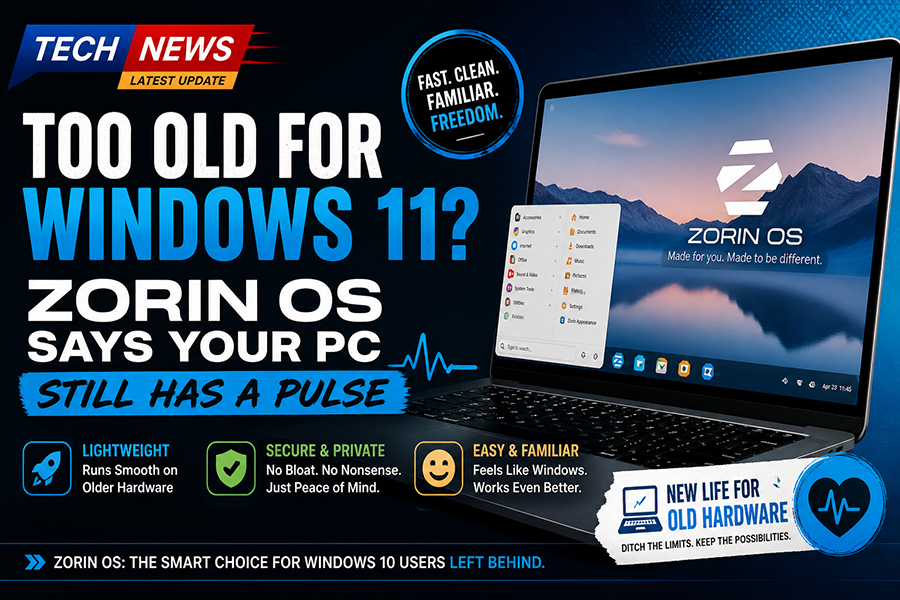
Too Old for Windows 11? Zorin OS Says Your PC Still Has a Pulse
Useful Software Sunday, 3 May 2026, 6:35 PM

Too Old for Windows 11? Zorin OS Says Your PC Still Has a Pulse


If you’ve spent the last few months watching your perfectly functional Windows 10 machine get side-eyed by Microsoft like it just showed up to a black-tie event in sweatpants, then congratulations, you’re exactly the audience Zorin OS has been quietly courting. And honestly, it’s doing a pretty good job of it.

Let’s start with the obvious: Windows 11. Microsoft decided that your computer needs to pass a hardware audition to join the cool kids club. TPM 2.0, Secure Boot, a CPU that wasn’t around during the invention of sliced bread… you know, totally reasonable requirements for people who just want to check email and occasionally yell at Excel. So now millions of perfectly usable PCs are being told, “Sorry, you’re vintage now.” Enter Zorin OS, sliding in like, “Hey… you still work? Cool, let’s hang out.”

Zorin OS is built on Linux, which immediately scares about 80 percent of Windows users who still think Linux requires chanting in a terminal and sacrificing a USB drive under a full moon. But here’s the twist: Zorin doesn’t look or feel like Linux. It looks suspiciously like Windows. On purpose. Not “inspired by,” not “loosely similar,” but “we know exactly what you’re used to, and we’re not here to ruin your day.”

The desktop layout is clean, familiar, and dare I say… comforting. Start menu? Check. Taskbar? Yep. Click things and they open? Revolutionary, I know. It’s like someone took Windows, removed the bloat, the nagging, the “please sign into 14 different services” popups, and said, “What if we just… didn’t do all that?”

And that’s really where Zorin OS is winning people over. It respects your time and your hardware. You install it, and it runs smoothly on machines that Windows 11 would laugh at before slamming the door. Old laptops that sounded like jet engines under Windows suddenly become quiet, usable, and dare I say… pleasant. It’s the digital equivalent of giving your PC a second life instead of sending it to the great recycling bin in the sky.

Another big reason for its growing popularity is how beginner-friendly it is. Zorin doesn’t throw you into the deep end of Linux and say “good luck.” It gently holds your hand and says, “See? You click here. Things work. Nobody is judging you.” It even has built-in layouts that mimic Windows or macOS, which is both incredibly helpful and slightly hilarious. It’s like an operating system with a personality that says, “I can be whoever you want me to be.”

Software support, the usual Linux complaint, has also come a long way. Between native apps, compatibility layers, and a surprisingly robust app store, most users will find everything they need. And for the average “I browse the web, watch videos, and occasionally pretend to be productive” user, it’s more than enough. Plus, no random forced updates restarting your system at the worst possible moment. Imagine that.

Of course, it’s not perfect. If you rely heavily on very specific Windows-only software, you might run into some friction. And yes, under the hood, it’s still Linux, which means if you go looking for trouble, you will absolutely find it. But the key point here is you don’t have to go looking. Zorin OS lets you stay in the shallow end and just… use your computer.

So why is Zorin OS gaining traction among stranded Windows 10 users? Simple. It solves a problem without creating five new ones. It gives people a way to keep using their existing hardware, avoids the increasingly heavy-handed ecosystem of modern Windows, and does it all without requiring a computer science degree.

In a world where your operating system increasingly feels like it owns you, Zorin OS is refreshingly chill. It doesn’t nag, it doesn’t judge, and it definitely doesn’t tell your perfectly good PC that it’s too old to matter.

And honestly, that alone might be its biggest selling point.


0 Likes 0 Comments
Read More
yt-dlp Review: The Swiss Army Knife of Downloading Stuff the Internet Pretends You Don’t Need
Useful Software Saturday, 25 April 2026, 9:17 PM

yt-dlp Review: The Swiss Army Knife of Downloading Stuff the Internet Pretends You Don’t Need


If you’ve ever tried downloading a video from the internet using one of those sketchy “paste link here” websites, you already know the experience usually ends with seventeen pop-ups, a suspicious browser extension, and a sudden urge to factory reset your computer. Enter yt-dlp, the command-line tool that walks in calmly, kicks the door open, and reminds everyone that competence still exists.

yt-dlp is an open-source media downloader that supports YouTube and a long list of other sites. It’s based on the old youtube-dl project, except where youtube-dl sometimes feels like it fell asleep in a bean bag chair, yt-dlp showed up caffeinated, organized, and ready to work. It’s faster, updated more often, and loaded with features that make tech-minded users grin like villains in a movie montage.

The first thing you notice is that yt-dlp doesn’t treat you like an idiot. There’s no giant shiny button that says “CLICK HERE TO DOWNLOAD NOW!!!” surrounded by fake ads and three blinking arrows. Instead, it gives you options. Real options. Format selection, audio extraction, subtitles, playlists, metadata embedding, thumbnails, archive handling, naming templates, rate limiting, retries, cookies, sponsorblock support, and enough switches to make a network engineer emotional.

Want the best quality video and audio merged automatically? Done. Want only MP3 audio from a podcast interview? Easy. Want an entire playlist neatly named and sorted? Of course. Want subtitles in English, Spanish, Klingon, and whatever else is available? Probably yes, because yt-dlp is an overachiever.

Now, is it beginner-friendly? Let’s be honest: not exactly. This is a command-line tool. It assumes you can type words into a terminal without breaking into a cold sweat. If your idea of advanced computing is changing your desktop wallpaper, there may be a learning curve. But the good news is the commands are straightforward, documentation is solid, and once you learn a few basics, you’ll wonder why you ever tolerated terrible downloader websites built by people who hate humanity.

Performance-wise, yt-dlp is excellent. It’s fast, reliable, and shockingly efficient. It often handles site changes quicker than commercial tools that charge money for the privilege of disappointing you. It also runs on Windows, Linux, and macOS, which means no matter what operating system you prefer to complain about, yt-dlp is there for you.

One of its biggest strengths is flexibility. yt-dlp can be as simple or as absurdly powerful as you want it to be. You can run one clean command to grab a video, or you can build a highly customized automated workflow that downloads content, embeds metadata, converts formats, names files perfectly, and stores everything like a digital librarian with trust issues.

Of course, no review would be complete without realism. Some websites fight downloaders aggressively, and platforms change things constantly. Occasionally you’ll need updates, cookies, or extra steps. But unlike many alternatives, yt-dlp usually has a fix, a workaround, or an update already in progress while other tools are still pretending everything is fine.

In short, yt-dlp is one of those rare utilities that feels made by people who actually use computers. It’s powerful, honest, fast, free, and doesn’t insult your intelligence. That alone makes it practically mythical in modern software.

Final Verdict: 9.5/10

If downloading media tools were superheroes, yt-dlp would be the one quietly doing all the real work while everyone else sells merchandise.


0 Likes 0 Comments
Read More